XMS
XMS items 2

No items match this filter.
XMS Inventory Overview
The XMS inventory page highlights a very small, highly specific selection of CS2 skins and related in-game items tied to this user profile. With only 2 items listed, this inventory is easy to scan and useful for anyone who wants a quick look at what XMS currently holds. The page is especially relevant for collectors, traders, and market watchers who prefer inventory-based browsing over searching across the entire CS2 market.
Because this is a user inventory page, the focus is on what XMS owns right now rather than on a broad catalog of items. That makes it a practical reference point for checking item availability, spotting low-cost entries, and understanding how even a small inventory can still include items with different purposes and market behavior. In 2026, inventory pages like this remain useful for comparing ownership patterns, following niche items, and identifying items that may be relevant for casual trade or collection tracking.
What This Inventory Is and Why It Matters
XMS currently has just 2 items in the inventory, which makes the page simple but still informative. Small inventories can be just as interesting as large ones because they often show a focused preference for specific item types or low-value collectibles. In this case, the inventory includes a skin-related item and a graffiti item, giving a compact snapshot of different CS2 cosmetic categories.
This matters because inventory pages provide context that standard item listings do not. Rather than looking at an isolated skin listing, you can see what a specific user owns and compare item mix, item count, and approximate value. For users interested in CS2 skins, this can help with trade research, price-awareness, and understanding how common or uncommon certain low-tier items appear in real inventories.
Notable Items in the XMS Inventory
The inventory contains only two notable items, but each represents a different type of CS2 cosmetic content. That contrast makes the page useful for quick inventory analysis, especially for users who want to identify what kind of items are present before deciding whether to browse further.
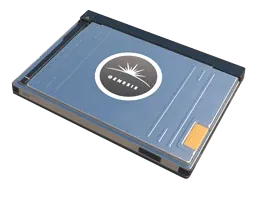
- Weapon CaseSealed Genesis Terminal — a notable item in the inventory and the most identifiable entry for tracking purposes.
- GraffitiChess King — a graffiti item that adds variety to the inventory and may appeal to players looking at lower-cost cosmetic items.
These two items are both relevant in a browsing and comparison context, even though the inventory is small. The combination of a weapon-related item and graffiti gives the page a broader utility than a single-item profile, and it may help users understand how XMS approaches item ownership across different CS2 categories.
Price Range, Value Profile, and 2026 Market Relevance
The listed inventory sits in a very low price range, from $0.01 to $0.08. That makes XMS a useful example of an ultra-budget inventory segment, where items are inexpensive but still worth tracking for completeness, trading convenience, or collection purposes. Low-price items often move differently from higher-end skins: they are less about prestige and more about accessibility, volume, and small-scale exchange value.
In 2026, low-cost CS2 inventory items continue to matter because they remain part of everyday market activity. Players still buy, sell, and trade inexpensive cosmetics, and inventory pages like this are useful for identifying items that sit near the bottom of the market. While these entries may not be high-value assets, they can still be relevant for users who want to build a basic inventory, compare low-tier listings, or maintain a complete market record.
For items in this range, rarity and wear details may have limited impact on overall pricing compared with premium skins, but they still influence how users perceive an item’s desirability. Even at very low prices, some buyers prefer specific item categories, and that can affect short-term interest. That is why a profile like XMS remains worth reviewing despite its modest total value.
Buying, Trading, and Value Tips
If you are comparing inventory items like those in XMS, the main value insight is that low-cost CS2 items are usually about convenience rather than investment potential. At this price level, the best approach is to focus on liquidity, current demand, and how easy the item is to trade or use. For buyers, the key question is often whether the item fits a collection goal or serves as a low-risk add-on.
For traders, inexpensive items can still be useful as balance pieces in larger exchanges. Small-value skins and graffiti are often used to round out trade differences, especially when a deal needs a minor value adjustment. That makes pages like this helpful when you are checking what a user has available and whether any item may be practical in a trade context.
Value-minded users should also keep in mind that inventory composition matters. A profile with only two low-priced items may not indicate strong market activity, but it can still provide a snapshot of what items are being held rather than immediately listed or sold. If you are tracking patterns across multiple inventories, this kind of page can help you compare ownership habits and spot common low-tier holdings.
How to Browse, Filter, and Compare on This Page
Use this inventory page as a starting point for fast comparison. Since XMS has only 2 items, it is easy to review the entire inventory without sorting through a long list. That makes it especially convenient for users who want a quick answer about what is owned, what type of items are included, and how the inventory fits into the broader CS2 skins ecosystem.
When comparing items, focus first on item type, then on price range, and finally on any individual differences that may affect interest. If you are comparing XMS against other inventories, the low total item count is itself a useful data point. It tells you this is a compact inventory rather than a broad collection, which can be important when evaluating trade readiness or market exposure.
For browsing purposes, use this page to identify the inventory’s notable items and then compare them against similar low-value entries elsewhere on the site. That helps you understand where the inventory sits in relation to other user inventories, especially if you are researching CS2 skin ownership patterns in 2026.
Quick FAQ
How many items are in the XMS inventory?
XMS has 2 items listed in this inventory.
What is the price range of the inventory?
The inventory spans from $0.01 to $0.08, placing it in a very low-cost segment of CS2 items.
What are the notable items?
The notable items are Weapon CaseSealed Genesis Terminal and GraffitiChess King.
Why look at a small inventory like this?
Small inventories are useful for quick ownership checks, low-value trade research, and comparing item types across users in 2026.
FAQ
How many items are in XMS?
This inventory page lists 2 CS2 items, each with its current market data and links to where you can win or trade it.
What is the price range for XMS in 2026?
Items in XMS range from $0.01 to $0.08 on the open market in 2026, depending on exterior, rarity and StatTrak status.
Where can I get XMS skins?
See our ranked site lists for case openings and trading, all rated by verified player reviews.